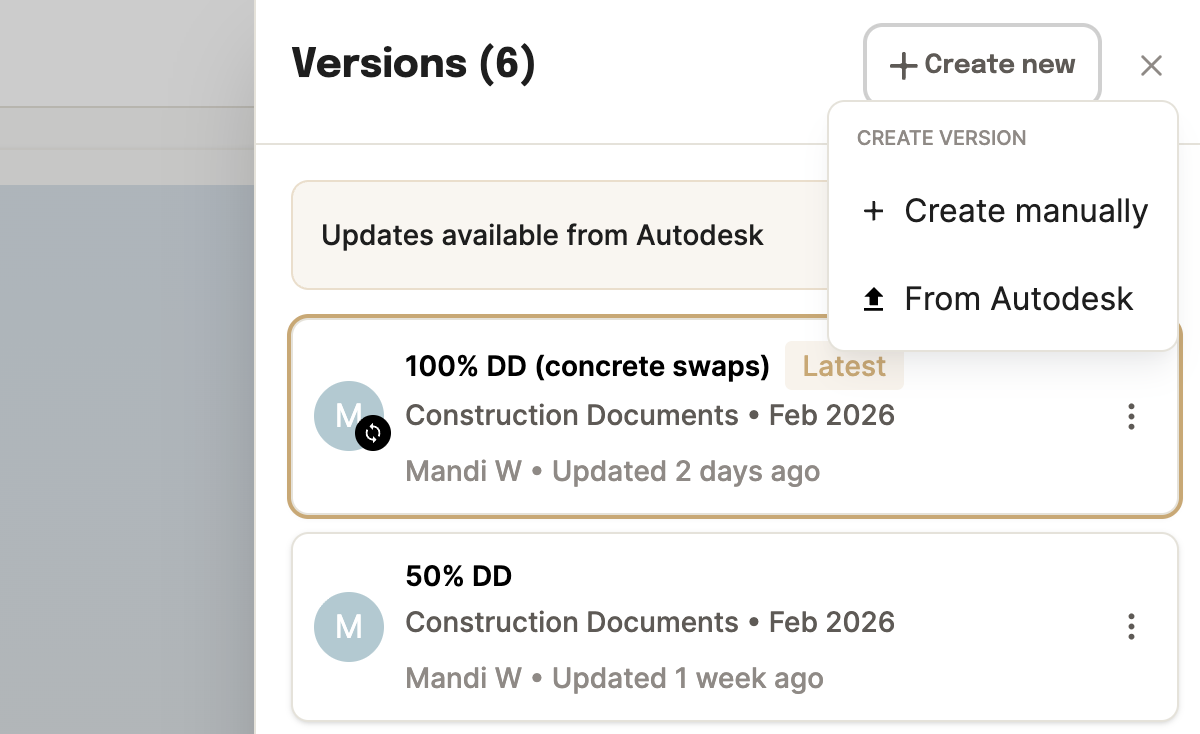
Creating a version
Open the version menu next to the project name in the header. You'll see two paths:
- Create new version — Upload the documents for the new version yourself.
- Create from Autodesk — Pick documents directly from your connected Autodesk project folders.
Navigating versions
Click the caret next to the version name at the top of the project to switch between versions. Everything updates to reflect that version's data.
Published vs. draft
Projects and versions can be published or unpublished:
- The newest published version is automatically labeled as "latest."
- Unpublished versions are kept for historical reference.
- Methodology changes apply to all versions, published and unpublished.
Version actions
| Action | What it does |
|---|
| Edit | Update the version name, date, or details. |
| Delete | Permanently removes the version. A confirmation prompt appears. |
| Copy | Duplicates all version data — including documents and takeoffs — into a new version. The new version stays attached to the same BIM model as the source. |
Comparing versions
Ask the agent what moved between two versions instead of exporting both and diffing them.
- "What changed in the structural scope since the last version?"
- "Compare embodied carbon between the DD and CD versions."
- "Which assemblies were added or removed?"
Documents and data
- Documents are uploaded per version. When copying a version, documents from the source version carry over to the new one.
- Download data to Excel for a single version or all versions of a project. The version name is included in the export.